
SMX-RKY01 User Guide
Preface
Section titled “Preface”Purpose of the Document
Section titled “Purpose of the Document”This document contains information about the following topics;
-
Activation of SMX-RKY01
-
Using DTLocker+ G3
Required Level of Knowledge In order to fully understand and apply this document, it is necessary to have knowledge of IT, Automation and Electricity.
Required Hardware and Software
Section titled “Required Hardware and Software”The hardware & software to be used in this manual is listed below.
Hardware
-
1 x SMX-RKY01
-
User PC
Software
-
Windows 7 or Windows 10 (32 Bit or 64 Bit) Operating System
-
Web Browser (Preferably Google Chrome)
Specifications
Section titled “Specifications”| Property | Description |
|---|---|
| Interface | 1xUSB 2.0 Type A |
| Operating System | Windows 7 (32/64 bit) Windows 8/8.1 (32/64 bit) Windows 10 Windows Server 2008 |
| Outer Case | Metal |
| Temperature (Study) | 0°C to 60°C |
| Temperature (Storage) | -20°C to 85°C |
| Physical Measurements | 65.76 mm x 17.98 mm x 10.7 mm |
| Certificate | SSL Certificate 2048 Bit |
Preparing Hardware
Section titled “Preparing Hardware”SMX-RKY01 (HW Key) Physical Connection
Section titled “SMX-RKY01 (HW Key) Physical Connection”Plug the SMX-RKY01 into an available USB port on your laptop or desktop PC and wait for Windows to detect new USB device.
Use of SMX-RKY01
Section titled “Use of SMX-RKY01”The user certificate is stored in USB, which encrypts at hardware level. The certificate is only valid as long as it is stored on this USB disk. Each certificate is marked with the USB serial number. The USB disk is protected by an external password. USB disk content cannot be displayed unless the password is entered.
You must pass the security phase before SMX-RKY01 can be used. To do this, you can follow these steps;
- After Windows detects SMX-RKY01, the “Auto Use” window will open. From this window, you can switch to the “Kingston Password” screen by selecting the “DTLplus_Launcher.exe” option.
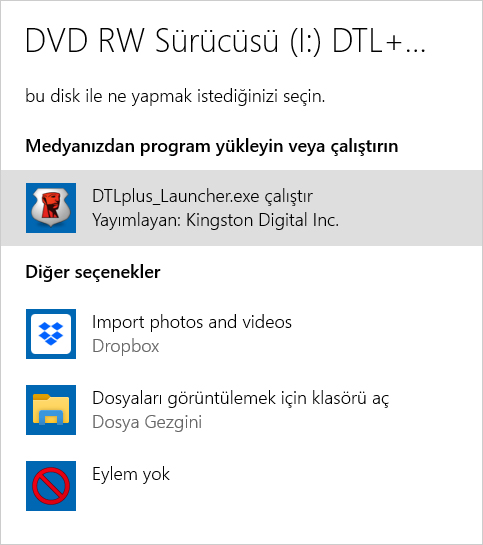 If the “Auto Use” window is not opened, run “Mycomputer”->“DTL+G3”->“DTLplus_Launcher.exe” The password screen will open.
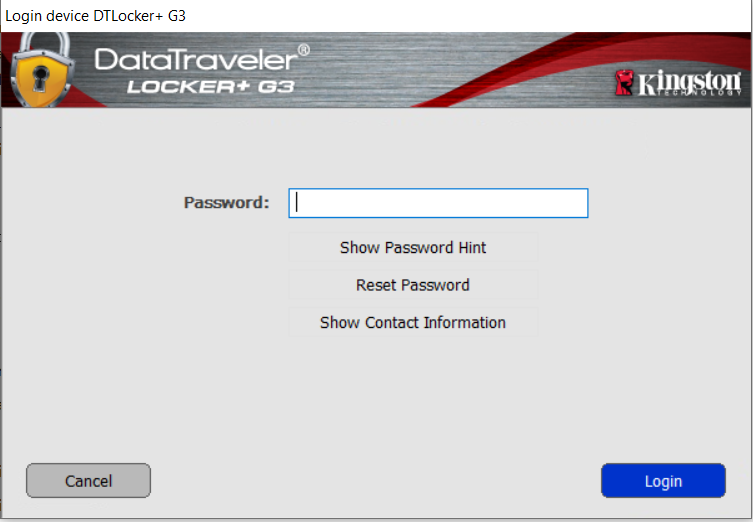
In the password screen that opens, there are different options besides the password field. These are as follows;
Show Password Hint: Shows a previously determined hint about your password.
Reset Password: This option should not be used to reset the password. When used, it completely resets and deletes your certificates. Your SMX-RKY01 password is unique to you. It is not saved on the system or anywhere. There’s no way to reset it if you forget your password. The only thing that can be done is to reset the SMX-RKY01 completely and re-create the certificate files. This is a manual procedure and you need to contact SimpLinx technical service. Show Contact Information: Shows contact information.
-
If you are entering your password for the first time, enter the default password.
-
After entering your password, press ENTER.
-
The relevant USB Disk files can be viewed. You can close the Explorer tabs that are opened.
-
Your user certificate is ready for use.
Windows taskbar will have an app called “DTLocker+G3”. With this app, you can update your password & information.
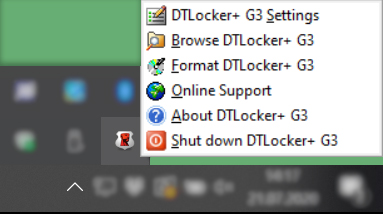
Updating Password and Hint
Section titled “Updating Password and Hint”To change your password or hint, click on the app in the Windows Taskbar, and then go to “DTLocker+G3 Settings”. The first screen that opens is the one where information about the password is changed.
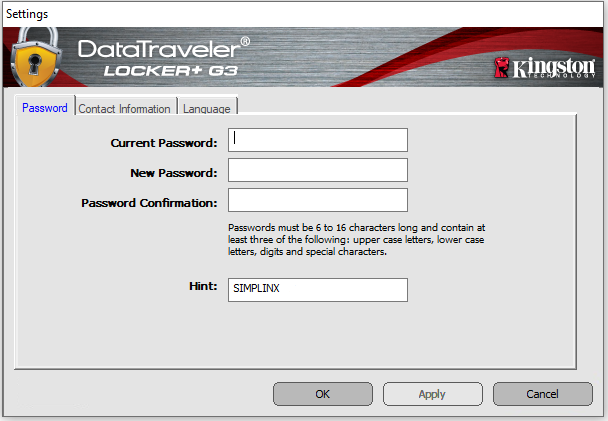
To change your password, enter your current password to the “Current Password” field. Then enter your new password in the “New Password” and “Password Confirmation” fields
If you also want to change the hint, you can enter and save new hint information in the bottom “Hint” field.
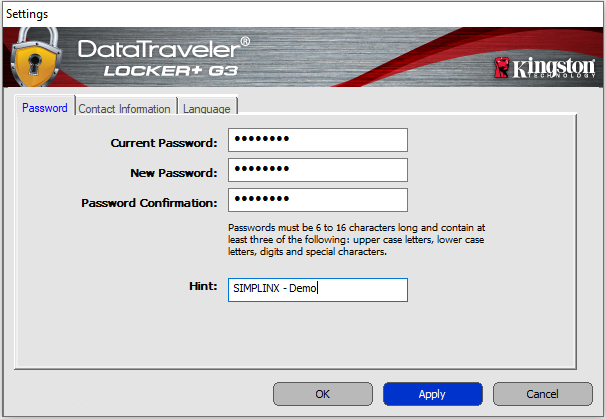
Updating Contact Information
Section titled “Updating Contact Information”To change the contact information of the owner of SMX-RKY01, click on the app in the Windows Taskbar,then go to “DTLocker+G3 Settings”. Go to the “Contact Information” tab.
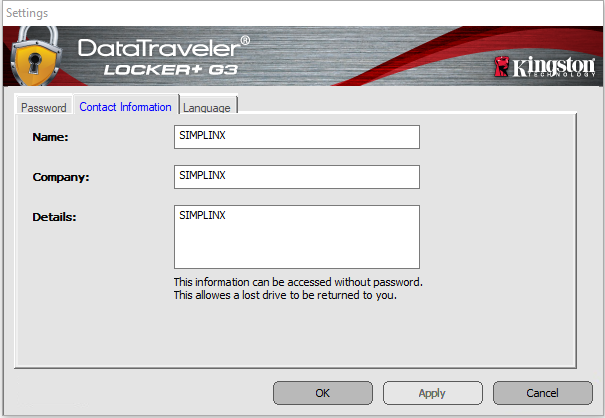
The information here comes as SIMPLINX by default.
Accessing Files in SMX-RKY01
Section titled “Accessing Files in SMX-RKY01”In order to access files on SMX-RKY01, click on the app in the Windows Taskbar, and then select “Browse DTLocker+G3”. The files in SMX-RKY01 will be listed.
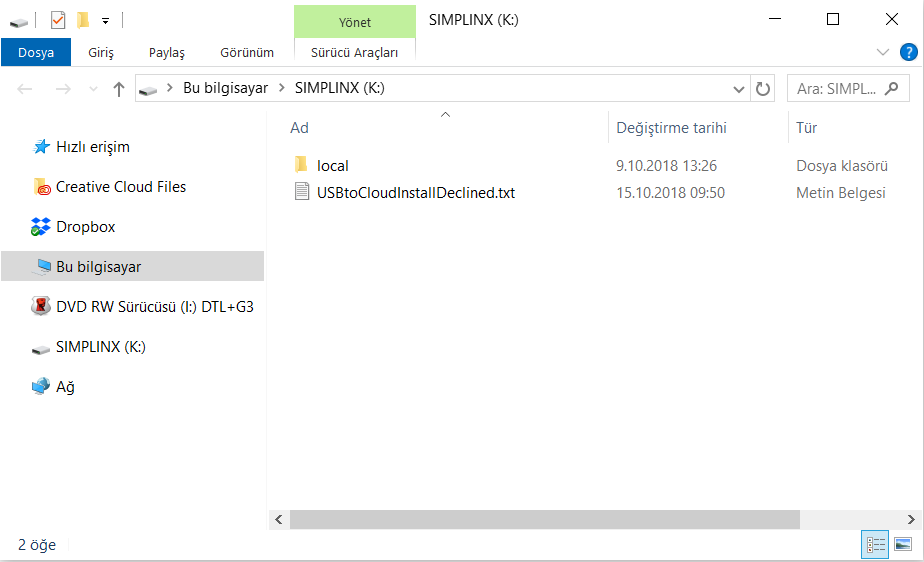
07/2020 man-en-smx-rky01.docx Version 1. 0 |
SimpLinx Elektronik Ltd. Halil Rifat Pasa Mh. Nazli Sk. No:1/5 No:17 Sisli/Istanbul www.simplinx.com |
|---|
Change Log
Section titled “Change Log”| Version | Date | Description |
|---|---|---|
| V1.0 | 07/2020 |
Legal Notices
Section titled “Legal Notices”Warning Notice System
Section titled “Warning Notice System”This document contains alerts and information indications for the safety of you and your devices. The symbols and meanings used to draw your attention to these notifications are listed below.
Qualified Personnel
Section titled “Qualified Personnel”It is assumed that what is described in this document will be applied by qualified personnel for the specific task.
Disclaimer
Section titled “Disclaimer”We have reviewed the contents of this publication to ensure consistency with the hardware and software described. Since variance cannot be precluded entirely, we cannot guarantee full consistency. The information in this publication is reviewed regularly and any necessary corrections are included in subsequent editions.