
Restricting Remote Access with the Digital Input
Overview
Section titled “Overview”From firmware 4.0 the SMX-RNS20 can make remote access depend on a physical switch. You wire a key switch — or any dry contact — to the device’s digital input and turn on one option. Remote access through SX-Client and the simplinx.net portal is then allowed only while the switch is closed.
This is for plants whose rule is that remote maintenance happens with someone’s knowledge on the shop floor. The decision moves from a password to a key in somebody’s pocket.
- Off by default. A device that updates to 4.0 behaves exactly as it did before, until someone turns the option on.
- The device decides, not the cloud. The gate is enforced on the device itself. It holds even if the device cannot reach the Simplinx servers.
- Level, not a timer. Access stays open for as long as the switch is closed. There is no window to re-arm and nothing expires halfway through a job.
- It fails safe. A broken wire reads as no voltage, which means blocked.
- Only remote access. The machine, the device’s own LAN, Modbus and its local web interface are untouched.
Which devices have the input
Section titled “Which devices have the input”| Board | Digital input |
|---|---|
| SMX-RNS03 | Yes |
| SMX-RNS11 | Yes |
| SMX-RNS02 | No — the page shows “This device has no digital input.” and the option is not offered |
Wiring
Section titled “Wiring”On SMX-RNS03 and SMX-RNS11 the terminals are numbered as below.
X1 is the device’s five-terminal block. Reading outwards: +24 V, 0 V, GND, DIN+, DIN−. The first two are where the device’s own 24 V supply arrives — the input is wired in series off that same supply, so you need no separate power source for it.
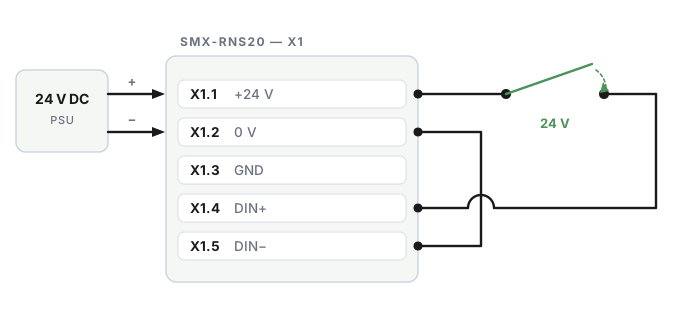
- X1.1 (+24 V) → one side of the key switch
- the other side of the key switch → X1.4 (DIN+)
- X1.5 (DIN−) → X1.2 (0 V)
The input is optocoupled and floating, so the contact goes in series with the supply, never to ground. Closing the switch puts 24 V on the input. Any dry contact does the job: a key switch on the cabinet door, a selector switch at the line, or a free contact from a relay you already have.
Turning it on
Section titled “Turning it on”-
Log in to the SMX-RNS20 web interface.
-
Go to Advanced Settings → Remote Access.
-
Check the wiring before you rely on it. The Now box shows the live state of the input even while the option is still off:
- Digital input — DI 1 - voltage on the input or DI 0 - no voltage on the input
- Remote access — what the device does with it right now
Turn the key both ways and watch the box follow it. It tracks the switch within a second.
-
Turn on Restrict remote access with the digital input (DI).
-
Click Save. The option takes effect once saved.
If you save the option while the key is off, the device is blocked from that moment — including your own colleagues’ sessions. Turn the key on first if someone is connected.
What happens with the option on
Section titled “What happens with the option on”| The input | Remote access |
|---|---|
| DI 1 — 24 V on the input, switch closed | Remote access allowed |
| DI 0 — no voltage, switch open | Remote access blocked |
| A broken or disconnected wire | Reads as DI 0 → blocked |
| The switch is turned off during a session | The open session is ended within about a second |
| The device is restarted with the switch off | Blocked from the first second — there is no window at boot |
What is blocked, and what is not
Section titled “What is blocked, and what is not”Blocked while the input is DI 0:
- remote connections from SX-Client;
- browser access through the portal, both to the device itself and to the LAN devices behind it.
Not blocked: the device’s own LAN, its Modbus server and this web interface — the machine keeps running and anyone on site keeps working.
What your users see
Section titled “What your users see”In the portal (simplinx.net)
- the device is listed as “Blocked by digital input” — in the device list, on the detail page and on the map;
- Connect is disabled, with the reason written next to it: “Remote access is blocked by the device’s digital input.”;
- local services (the Open buttons for browser access) are disabled too;
- there is no automatic retry. The portal does not sit there reconnecting.
In SX-Client
A session cut by the switch reports “The device is refusing remote access - its digital input is open.” The client does not reconnect on its own; it waits for someone to turn the key.
Who may change the option
Section titled “Who may change the option”The builtin admin account, and any user account that has the Network permission. Everyone else can see the page but not change it.
Audit trail
Section titled “Audit trail”Turning the option on or off is logged, and so is every change of the input. With log export to a syslog / SIEM server turned on, those lines reach your own SIEM, so “who opened remote access, and when” is answerable from your system rather than ours.
Troubleshooting
Section titled “Troubleshooting”| Symptom | Check |
|---|---|
| The Now box says DI 0 with the key closed | Polarity and terminals: X1.1 → switch → X1.4, and X1.5 → X1.2. Measure 24 V between X1.4 and X1.5 with the key closed |
| The box says Unknown | The device has not read the input yet, or this board has no digital input — SMX-RNS02 shows the “no digital input” message instead of the option |
| The option is not on the page | The board has no digital input (SMX-RNS02), or your account does not have the Network permission |
| Remote access is still blocked with the key closed | Open the page and confirm the Now box follows the key. If the input is DI 1 and access is still blocked, the device may have lost contact with its own control loop — reboot it and check again |
| A restored backup switched the option off | A backup that carries the option restores it only onto a board that has the input. Restoring onto an SMX-RNS02 leaves it off, and the device logs that it did |