
Remote IO — Siemens S7-1200/1500 Connection
Overview
Section titled “Overview”The SMX-RNS20 Remote IO feature can connect to Siemens S7-1200 and S7-1500 PLCs using the Siemens S7 (ISO-on-TCP) driver. This allows the device to read/write DB (Data Block), M (Memory), I (Input), and Q (Output) areas without a VPN or open firewall rules.
PLC Configuration
Section titled “PLC Configuration”In TIA Portal, make sure the following two settings are configured:
1. Disable Optimized block access on all Data Blocks that Remote IO will read. Right-click the DB → Properties → Attributes → uncheck “Optimized block access”.
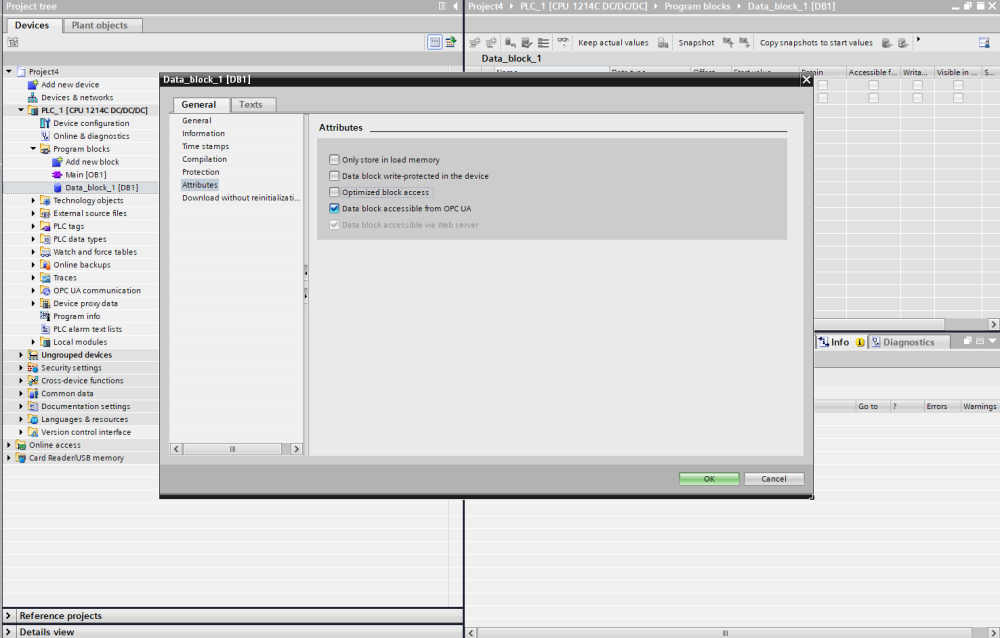 TIA Portal — uncheck “Optimized block access” in the Data Block properties
2. Enable PUT/GET communication. In PLC properties → Protection & Security → Connection mechanisms → check “Permit access with PUT/GET communication from remote partner”.
 TIA Portal — enable PUT/GET access in CPU Protection & Security settings
The PLC must also have a static IP address on the same LAN subnet as the SMX-RNS20.
SMX-RNS20 Remote IO Configuration
Section titled “SMX-RNS20 Remote IO Configuration”- Log in to the SMX-RNS20 web interface and navigate to Remote IO → Connections.
- Click Add Connection and select Driver: Siemens S7.
- Enter the PLC’s IP address, Rack (usually 0), and Slot (usually 1 for S7-1200, 0 for S7-1500).
- Add the data points you want to read: select Area (DB, M, I, Q), enter DB number (for DB area), Offset, and Data type.
- Set the scan interval and save the configuration. The SMX will begin polling the PLC.
- View live values under Remote IO → Monitor.