
Internet from a phone over USB
Change List (Change Log)
Section titled “Change List (Change Log)”| Version | Date | Description |
|---|---|---|
| V1.0 | 07/2020 | Draft |
| V1.1 | 07/2020 | Typos |
Preface
Section titled “Preface”Purpose of the Document
Section titled “Purpose of the Document”The document contains information about the following topics;
-
USB Connection of SMX-RNS Module via mobile phone
-
Providing Internet via USB from Android phone to SMX-RNS
-
Providing Internet via USB from iOS phone to SMX-RNS
Required Level of Knowledge
Section titled “Required Level of Knowledge”In order to fully understand and apply this document, it is necessary to have knowledge of IT, Automation and Electricity.
Required Hardware and Software
Section titled “Required Hardware and Software”The hardware that is needed to use this guide is listed below.
Hardware
- 1 x SMX-RNS20 Module
-
1 x Android or iOS Mobile Phone
-
1 x Mobile Phone-Appropriate Charging/Data Cable
Preparing Hardware
Section titled “Preparing Hardware”USB Connection of SMX-RNS Module via Phone
Section titled “USB Connection of SMX-RNS Module via Phone”The SMX-RNS20 module has 2 USB slots. Plug the USB end of charging/data cable into the SMX-RNS20 module’s USB slot and CONNECT the other end to your mobile phone.
Electrical Connection of SMX-RNS20 Module
Section titled “Electrical Connection of SMX-RNS20 Module”The SMX-RNS20 module has one terminal group. The terminal group is called X1. The X1 terminal group has 3 terminals. They are in order as follows;
| X1 | ||
|---|---|---|
| + | - | GND |
Connect your power supply’s output to the appropriate terminals (+), (-) and GND.
Providing Internet via USB from Android Phone to SMX-RNS
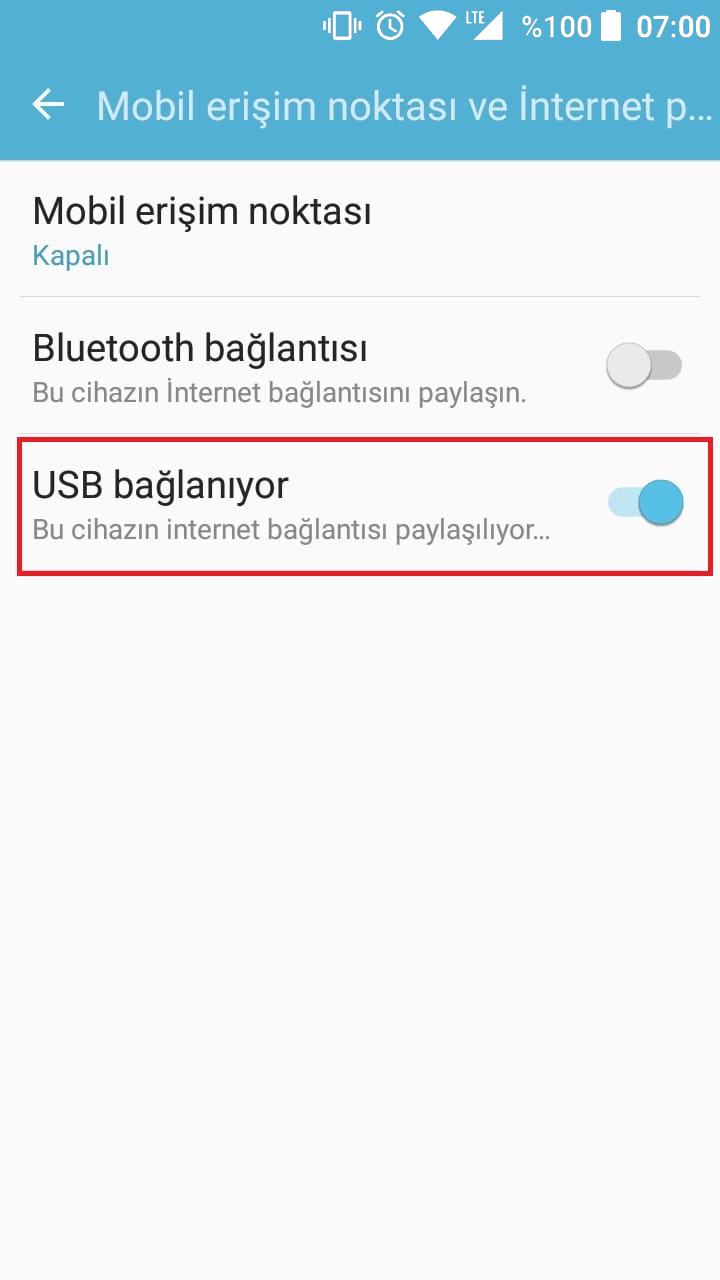
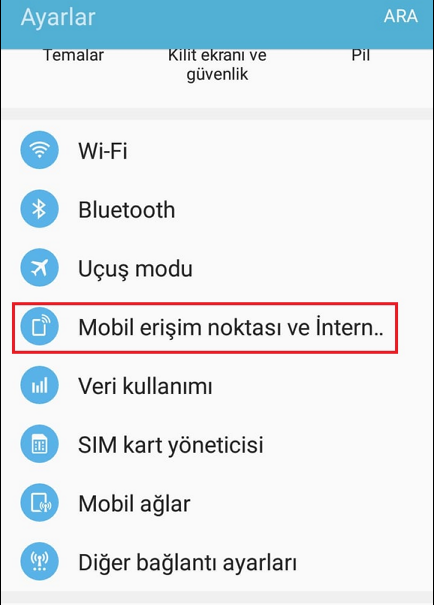
Section titled “Providing Internet via USB from Android Phone to SMX-RNS”Once the USB connection is done, enter the settings section of your Android mobile phone. From the Settings menu, go to Mobile Access Point and Internet Sharing (the menu content may vary depending on the phone brand and model) section and activate the USB Connection option from there. Within seconds, your SimpLinx device’s online LED will be lighted with green color and the device will be connected to internet with a USB cable from your Android mobile phone.
Providing Internet via USB from iOS Phone to SMX-RNS
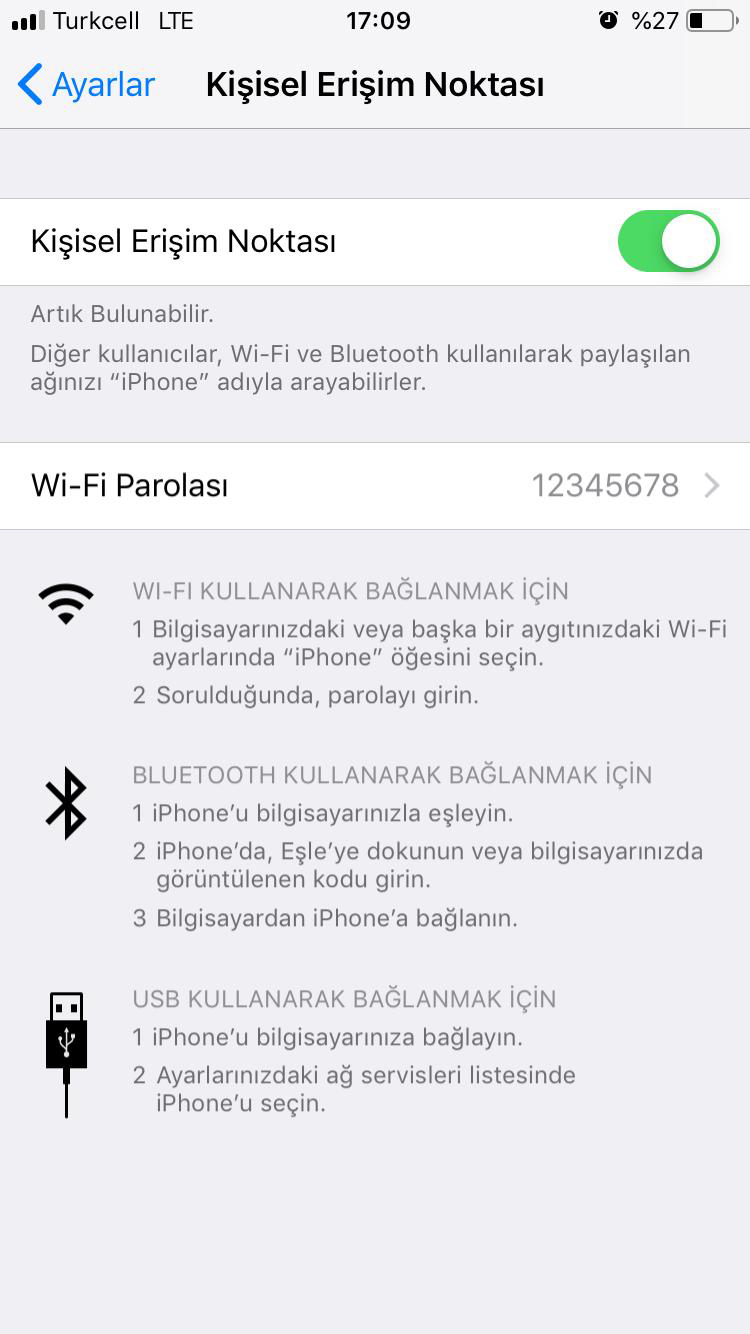
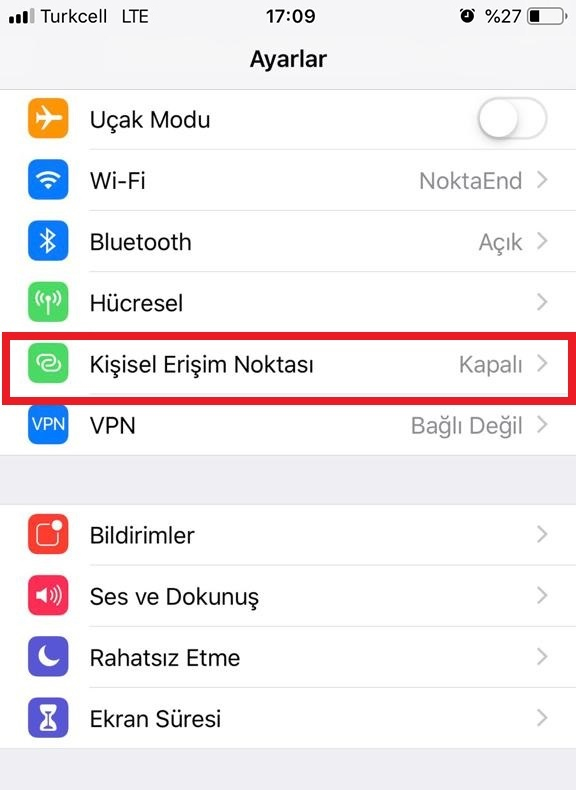
Section titled “Providing Internet via USB from iOS Phone to SMX-RNS”Once the USB connection is done, enter the settings section of your phone. From the Settings menu, go to Personal Hotspot section and then activate the Personal Hotspot option. Within seconds, your SimpLinx device’s online LED will be lighted with green color and the device will be connected to internet with a USB cable from your iOS mobile phone.
V
07/2020 man-en-usb-phone-tethering.docx Version 1. 1 |
SimpLinx Elektronik Ltd. Halil Rifat Pasa Mh. Nazli Sk. No:1/5 No:17 Sisli/Istanbul www.simplinx.com |
|---|
Legal Notices
Section titled “Legal Notices”Warning Notice System
Section titled “Warning Notice System”This document contains alerts and information indications for the safety of you and your devices. The symbols and meanings used to draw your attention to these notifications are listed below.
Qualified Personnel
Section titled “Qualified Personnel”It is assumed that what is described in this document will be applied by qualified personnel for the specific task.
Disclaimer
Section titled “Disclaimer”We have reviewed the contents of this publication to ensure consistency with the hardware and software described. Since variance cannot be precluded entirely, we cannot guarantee full consistency. The information in this publication is reviewed regularly and any necessary corrections are included in subsequent editions.