
"pniopcac.exe Assertion Failed" Error
Problem
Section titled “Problem”When establishing a remote connection, the error “pniopcac.exe Assertion Failed” appears on computers that have Siemens PLC software (e.g., TIA Portal, STEP 7) installed.
Root cause: Siemens software installs a PROFINET IO RT-Protocol on all network adapters, including the virtual Simplinx network adapter. This protocol conflicts with the connection process.
Solution
Section titled “Solution”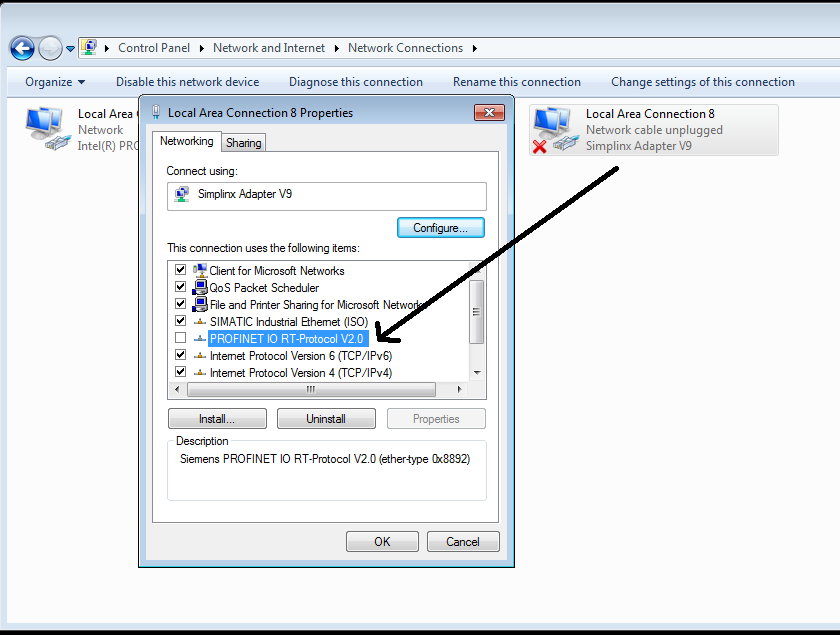 Network Adapter Properties — uncheck PROFINET IO RT-Protocol from the Simplinx adapter
- Open Control Panel → Network and Internet → Network Connections (or press Win+R, type
ncpa.cpl). - Locate the Simplinx Network Adapter in the list of adapters.
- Right-click the Simplinx adapter and select Properties.
- In the list of protocols/services, find “PROFINET IO RT-Protocol VX.X” and uncheck / remove it.
- Click OK to apply, then close the Properties dialog.
- Retry your remote connection — the error should no longer appear.